Malware Analysis Strings
 Thuri
ThuriThis post is a writeup of “strings” challenges by MalwareTech. The challenges can be downloaded from the author’s website challenges.
The goal of “strings” challenges is to understand implementation of strings in malware through static analysis. Strings are very useful in storing the configurations, decryption keys, data and C2 server addresses.
For analysis, I will use IDApro free for analysis. The author of the challenges provides a set of rules to follow while solving.
- You are not require to run strings1.exe, this challenge is static analysis only.
- Do not use a debugger or dumper to retrieve the decrypted flag from memory, this is cheating.
- Analysis can be done using the free version of IDA Pro (you don’t need the debugger).
Challenge1 - Strings1
strings1.exe contains an un-encrypted flag stored within the executable. When run, the program will output an MD5 hash of the flag but not the original. Can you extract the flag?
Knowing the binary is a windows PE, drag binary into IDA for analysis. Initial analysis of the binary is fast because binary is relatively small. The disassembled code is as one shown in the image.
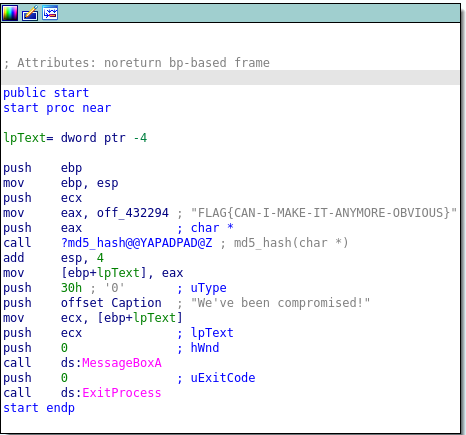
From the analysis of disassembled code, we take flag as input and print out md5 of the flag. The md5_hash function is responsible for calculating the MD5 hash of the flag and MessageBoxA is responsible for displaying the md5hash of the flag in a modal dialog box.
The correct flag is FLAG{CAN-I-MAKE-IT-ANYMORE-OBVIOUS}
Inputting the above flag in the authors website we get a correct message. Correct flag for strings1!
Challenge2- Strings2
strings2.exe contains an un-encrypted flag stored within the executable. When run, the program will output an MD5 hash of the flag but not the original. Can you extract the flag?
Goal of the second challenge is to understand stack strings. Stack strings is where strings are copied in single bytes at a time, this helps malware avoid detection algorithms of common strings.
Load second binary into IDA for analysis. The main function of the binary looks like the one shown in the image below.
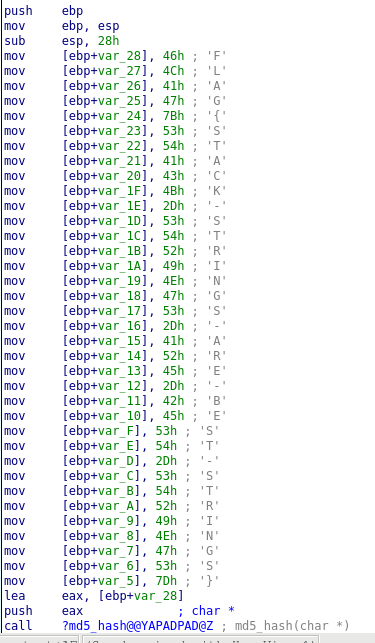
From above disassembled code, the flag string is pushed in single bytes, and then passed to the md5_char function. m5_char function is responsible for calculating the MD5sum of the flag as previous seen in challenge1. Concatenating the bytes we get our second flag.
The flag is FLAG{STACK-STRINGS-ARE-BEST-STRINGS}
Challenge3 - Strings3
strings3.exe contains an un-encrypted flag stored within the executable. When run, the program will output an MD5 hash of the flag but not the original. Can you extract the flag?
Goal of the challenge is understanding how malware uses resources section of the PE. Drag the strings3 binary into IDA and disassemble the main function. The disassembled code looks the one in the image below.
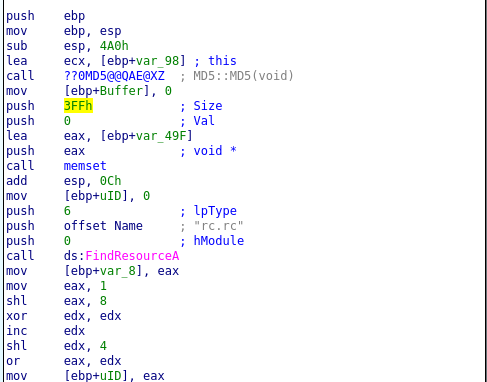
Looking at the above function is we have a new function, FindResourceA. Looking at the windows documentation, FindResourceA function is responsible determination of a resource with the specified type and name in the specified module as shown in the code snip below.
HRSRC FindResourceA(
  [in, optional] HMODULE hModule,
  [in]           LPCSTR  lpName,
  [in]           LPCSTR  lpType
);
From the disassembly above, the name of the resource we are referencing is rc.rc. After the execution of FindResourceA function it returns an handle to the specified resource`s information block. In x86 assembly code the return values of functions are put in eax register.
From the above code we can reconstruct the c-style code of the FindResource function.
FindResourceA(0, "rc.rc", 6)The handle module is 0 which is then stored in eax register and then used for calculation of the UID of the resource as shown in assembly below.
mov [ebp+var_8], eax
mov eax, 1
shl eax, 8
xor edx, edx
inc edx
shl edx, 4
or eax, edx
From the above assembly code, the value of eax is 0. The first line saves eax value to a memory register.
Second line increments eax register value by 1. Therefore the new value of eax register is eax=1.
Third line, shifts the bits value of eax register to the left by 8 times. we calculate the new value using python.
>>> 1 <<8
256
>>>
Value of 1 shifted to the left 8 times becomes 256 as shown above.
Fourth line, is we are clearing the edx register through xor operation. Therefore the value of edx is 0.
Line 5 we increment the value of edx by 1. The new value stored in edx register is 1, edx=1 .
Line 6 we shift the value of edx register by 4 positions to the left.
>>> 1 <<4
16
>>>
From the calculation above, the new value od edx register is 16. edx=16. Therefore for the last line we are doing a bitwise inclusive OR operation of value at eax and edx register.
The values for eax and edx registers are 256 and 16 respectively.
>>> 256 | 16
272
>>>
The result of the bits operation are therefore stored on the eax register. The new eax value is 272. Finally the value of eax register is the stored in memory address referenced below by UID
mov [ebp+UID], eax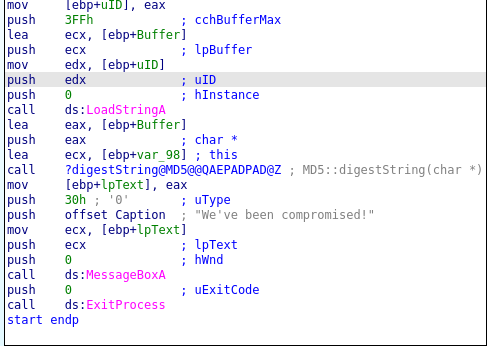
The analysis of the disassembled code above, shows the binary loads a resource from the executable referenced by uID. The function structure for the LoadStringA functions looks like the one below.
int LoadStringA(
  [in, optional] HINSTANCE hInstance,
  [in]           UINT      uID,
  [out]          LPSTR     lpBuffer,
  [in]           int       cchBufferMax
);
The uID integer value of the resource to be loaded is 272. For viewing the executable resources you can use ResourcesEditor tool or python3 pefile library as shown in the code below.
import pefile
pe = pefile.PE("./strings3.exe_")
pe.print_info()
The above 2 line of python3 code print all the information about the executable. As shown below is our resources section and references the string uid we are loading.
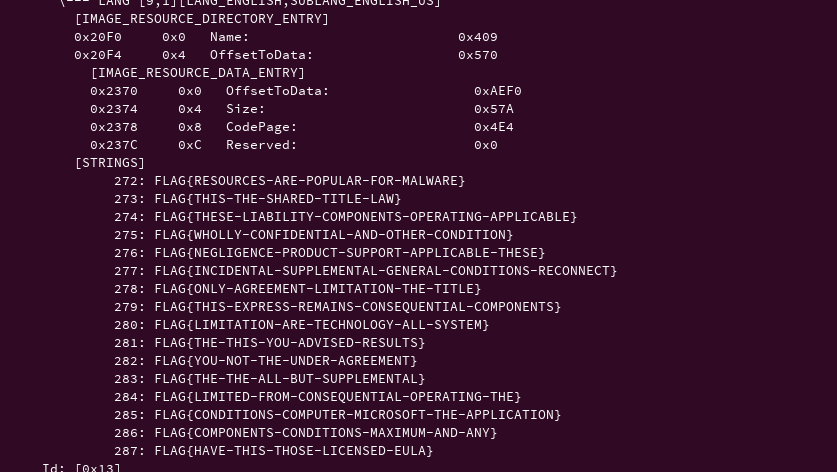
From the image above, FLAG{RESOURCES-ARE-POPULAR-FOR-MALWARE} string is loaded into the buffer through LoadStringA function referenced by uid 272. The pointer to the string is then passed to md5 function which is used for calculating md5 value of the string and then displayed in the modal box.
The correct flag is FLAG{RESOURCES-ARE-POPULAR-FOR-MALWARE}.
References
- For learning more about resource section of Portable Executable, check PE resources by @struppigel .