Android Application Security
 Thuri
ThuriAndroid application security is an important aspect in developer workflow in ensuring confidentility, integrity and Accessibility of an application. This article showcases various security concepts and application weaknesses that can be exploited by an attacker.
For demo purposes, android application used to demostrate different security concepts and weaknesses such as hardcoded secrets, weak cryptographic implementations, misconfigurations, webview vulnerabilities, etc is InjuredAndroid by @B3nac. The application can be downloaded from either playstore or author’s github repository.
Downloaded application can be either installed in an physical android device or Emulator.Run the adb command below to install application to either emulator or android phone.
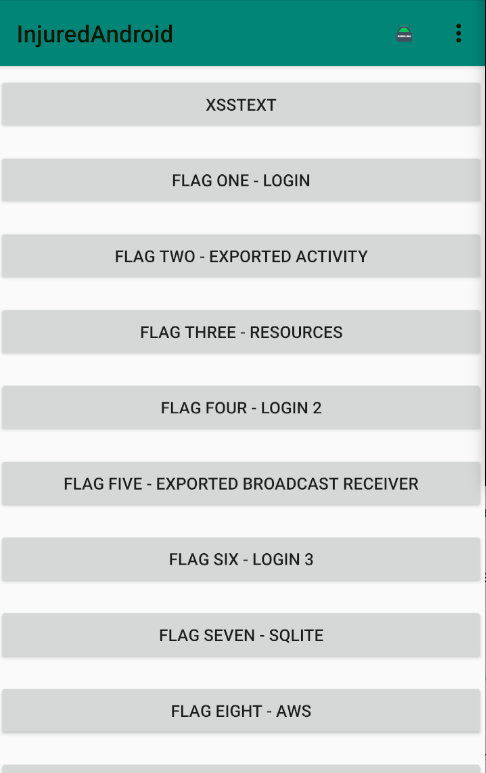
adb install InjuredAndroid-1.0.12-release.apkOpening installed application will have a user interface as shown in image below.
For analysis of the security posture of an application, one can choose either static analysis or dynamic analysis. Some of the static analysis tools used are:
- JADX
- Text Editor (Visual Studio)
- Android Studio
JADX is a bundle of command line and GUI tools that enables one to produce java source code from android Dex and APK files. It aids in decompiling the android application to java code which is more human-readable/friendly.
NB: For reverse engineering/ code auditing of every application, you need to have a clear set of goal or objective of what you want to achieve. This helps narrow down the analysis and avoid many rabbit holes.
FLAG 1 - LOGIN
Goal: Input the right flag
Objective of the first level is to get the correct flag. flag is a piece of reward if you do a correct task you are asked to in the Capture Flag competition. Looking at decompiled code below, there is an interesting function called submitFlag which is responsible for the validation of user input.
public final void submitFlag(View view) {
        EditText editText = (EditText) findViewById(R.id.editText2);
        C2724g.m882d(editText, "editText2");
        if (C2724g.m885a(editText.getText().toString(), "F1ag_0n3")) {
            Intent intent = new Intent(this, FlagOneSuccess.class);
            new FlagsOverview().m4085J(true);
            new ApplicationC1492j().m4065b(this, "flagOneButtonColor", true);
            startActivity(intent);
        }
    }
From the code above, FlagoneActivity class implements a comparison functionality of user input with the hardcoded flag. The user flag string is compared with hardcoded flag which is “F1ag_0n3”. The method m10785a compares the two objects (user input flag and hardcoded flag) and returns a boolean depending on the result of the comparison which can be either be true or false.
public static boolean m10785a(Object obj, Object obj2) {
        return obj == null ? obj2 == null : obj.equals(obj2);
    }
If the true condition is satisfied, a FlagOneSuccess Intent is started . Entering hardcoded flag as our input, we get a success message and the color of Flag1** in flagsOverview Activity changes to green. Green color means the challenge has been successfully solved.
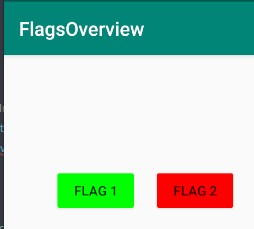
Level1 flag is F1ag_0n3. For other levels, if solved successfully, the color of the flag corresponding level will change to green.
FLAG 2 - EXPORTED ACTIVITY
Goal : There is a way to bypass the main activity and invoke other activities that are exported.
What is an activity?
An activity is a single focused thing that the user can do. It is an application component that provides a user interface for users to interact with.
Looking at the flagtwoactivity source code below.
public class FlagTwoActivity extends ActivityC0453c {
    /* renamed from: w */
    int f4461w = 0;
    /* renamed from: F */
    public /* synthetic */ void m4090F(View view) {
        int i = this.f4461w;
        if (i == 0) {
            Snackbar X = Snackbar.m2647X(view, "Key words Activity and exported.", 0);
            X.m2646Y("Action", null);
            X.mo2650N();
            this.f4461w++;
        } else if (i == 1) {
            Snackbar X2 = Snackbar.m2647X(view, "Exported Activities can be accessed with adb or Drozer.", 0);
            X2.m2646Y("Action", null);
            X2.mo2650N();
            this.f4461w = 0;
        }
    }
    /* access modifiers changed from: protected */
    @Override // androidx.appcompat.app.ActivityC0453c, androidx.fragment.app.ActivityC0797d, androidx.activity.ComponentActivity, androidx.core.app.ActivityC0714e, android.app.Activity
    public void onCreate(Bundle bundle) {
        super.onCreate(bundle);
        setContentView(R.layout.activity_flag_two);
        m8078C((Toolbar) findViewById(R.id.toolbar));
        ((FloatingActionButton) findViewById(R.id.fab)).setOnClickListener(new View.OnClickListener() { // from class: b3nac.injuredandroid.d
            @Override // android.view.View.OnClickListener
            public final void onClick(View view) {
                FlagTwoActivity.this.m4090F(view);
            }
        });
    }
}
The onCreate application lifecycle method is used for initializing the activity on start. The goal of the challenge is to invoke the flagtwoactivity from an external application. This activity is an exported activity, meaning it can be started outside the context of the application.
Activities in android are defined in Manifest file AndroidManifest.xml.
<activity android:name="b3nac.injuredandroid.b25lActivity" android:exported="true"/>Activity b3nac.injuredandroid.b25lActivity can be invoked by an external application because android:exported attribute is set to true. For starting an external application which are exported one can use adb or write an android application to interact with exported activities.
vx@archie:~$ adb shell pm list packages | grep injuredandroid
package:b3nac.injuredandroid
What happens when invoke b25lActivity class activity?
When b25lActivity activity is invoked by an external application, it sets flag2 color to green in the FlagsOverview activity as illustrated in the code below.
/* loaded from: classes.dex */
public final class b25lActivity extends ActivityC0453c {
    /* access modifiers changed from: protected */
    @Override // androidx.appcompat.app.ActivityC0453c, androidx.fragment.app.ActivityC0797d, androidx.activity.ComponentActivity, androidx.core.app.ActivityC0714e, android.app.Activity
    public void onCreate(Bundle bundle) {
        super.onCreate(bundle);
        setContentView(R.layout.activity_b25l);
        ApplicationC1492j.f4506j.m4062a(this);
        new FlagsOverview().m4082M(true);
        new ApplicationC1492j().m4065b(this, "flagTwoButtonColor", true);
    }
}
Invoke the activity b25lActivity using adb. An alternative method of invoking exported activities is by creating an android application that starts the target`s activity.
vx@archie:~$ adb shell am start  -n b3nac.injuredandroid/.b25lActivity
Starting: Intent { cmp=b3nac.injuredandroid/.b25lActivity }
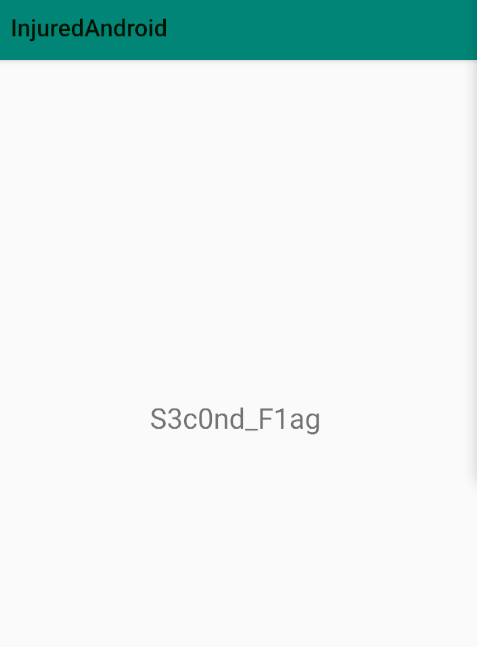
When activity two is started successfully through an external application, we are rewarded with a flag.
FLAG 3 - RESOURCES
Goal: Understanding how an application references Resources.
Android resources are used for defining colors, images, layouts, menus and string values. Everything defined in resources is referenced in the application`s code.
The decompiled code for FlagThreeActivity is shown below.
    public final void submitFlag(View view) {
        EditText editText = (EditText) findViewById(R.id.editText2);
        C2724g.m882d(editText, "editText2");
        if (C2724g.m885a(editText.getText().toString(), getString(R.string.cmVzb3VyY2VzX3lv))) {
            Intent intent = new Intent(this, FlagOneSuccess.class);
            new FlagsOverview().m4083L(true);
            new ApplicationC1492j().m4065b(this, "flagThreeButtonColor", true);
            startActivity(intent);
        }
    }
Looking at submitFlag function defined in FlagThreeActivity.java, the function is comparing user input with the value referenced at Resource cmVzb3VyY2VzX3lv . R stands for a resource.
Looking at strings we get flag as referenced by the string above.
<string name="cmVzb3VyY2VzX3lv">F1ag_thr33</string>The flag is F1ag_thr33.
FLAG 4 - LOGIN2
Goal: Get the right flag
For flag four we analyze FlagFourActivity.java. activity and figure out the logic implemented by the submitflag class. In decompiled code, we get user input and compare it with bytes in variable a. To understand the logic we analyze the method c1489g and member class m4070a.
public class C1489g {
    /* renamed from: a */
    private byte[] f4499a = Base64.decode("NF9vdmVyZG9uZV9vbWVsZXRz", 0);

    /* renamed from: a */
    public byte[] m4070a() {
        return this.f4499a;
    }
Public class c1489g, implements base64 decoding of the byte string and returns decoded string to submitFlag class. Decoding the base64 encoded string we get the flag for level 4 **4_overdone_omelets**
FLAG 5 - EXPORTED BROADCAST RECEIVERS
Goal: Understand how Broadcast receivers work
An application receives broadcasts in two ways:
- Through manifest-declared receivers.
- Context-registered receivers.
Manifest-declared receivers - This causes the system to launch an application when a broadcast is received. Searching in AndroidManifest.xml file we get where our broadcast is declared.
<receiver android:name="b3nac.injuredandroid.FlagFiveReceiver" android:exported="true"/>
<activity android:theme="@style/AppTheme.NoActionBar" android:label="@string/title_activity_flag_five" android:name="b3nac.injuredandroid.FlagFiveActivity"/>
In order to understand the Broadcast receivers, analyze oncreate() method in FlagFiveActivity.java file.
public void onCreate(Bundle bundle) {
        super.onCreate(bundle);
        setContentView(R.layout.activity_flag_five);
        m8078C((Toolbar) findViewById(R.id.toolbar));
        ((FloatingActionButton) findViewById(R.id.fab)).setOnClickListener(new View.OnClickListener() { // from class: b3nac.injuredandroid.c
            @Override // android.view.View.OnClickListener
            public final void onClick(View view) {
                FlagFiveActivity.this.m4118G(view);
            }
        });
        new ComponentName(this, FlagFiveReceiver.class);
        getPackageManager();
        C0310a.m8404b(this).m8403c(this.f4409x, new IntentFilter("com.b3nac.injuredandroid.intent.action.CUSTOM_INTENT"));
        ((Button) findViewById(R.id.button9)).setOnClickListener(new View.OnClickListener() { // from class: b3nac.injuredandroid.b
            @Override // android.view.View.OnClickListener
            public final void onClick(View view) {
                FlagFiveActivity.this.m4117H(view);   // invokes the intent
            }
        });
    }
From the above code, clicking the flag2 button, we invoke intent which is defined in m4117H class.Intent is used to perform an action on the screen. Therefore clicking the button element in our application we are invoking a new intent. Intents are used for sending a broadcast receiver.
 /* renamed from: H */
    public /* synthetic */ void m4117H(View view) {
        m4119F();
    }

public void m4119F() {
        sendBroadcast(new Intent("com.b3nac.injuredandroid.intent.action.CUSTOM_INTENT"));
    }
Analyzing component name FlagFiveReceiver class, when an intent is invoked twice, we get flag. The class implements a conditional if else loop condition for checking the number of intents. When the correct flag is displayed, the intents counter is set to zero( i2 = 0), where i2 variable is the intent counter as shown in the java code below.
public final class FlagFiveReceiver extends BroadcastReceiver {

    /* renamed from: a */
    private static int f4410a;

    @Override // android.content.BroadcastReceiver
    public void onReceive(Context context, Intent intent) {
        String str;
        int i;
        C2724g.m881e(context, "context");
        C2724g.m881e(intent, "intent");
        ApplicationC1492j.f4506j.m4062a(context);
        int i2 = f4410a;
        if (i2 == 0) {
            StringBuilder sb = new StringBuilder();
            sb.append(C2765h.m809e("\n    Action: " + intent.getAction() + "\n\n    "));
            sb.append(C2765h.m809e("\n    URI: " + intent.toUri(1) + "\n\n    "));
            str = sb.toString();
            C2724g.m882d(str, "sb.toString()");
            Log.d("DUDE!:", str);
        } else {
            str = "Keep trying!";
            if (i2 != 1) {
                if (i2 == 2) { //Number of times to invoke out intents
                    new FlagsOverview().m4087H(true);
                    new ApplicationC1492j().m4065b(context, "flagFiveButtonColor", true);
                    Toast.makeText(context, "You are a winner " + C1494k.m4061a("Zkdlt0WwtLQ="), 1).show();
                    i = 0;
                    f4410a = i;
                }
                Toast.makeText(context, str, 1).show();
                return;
            }
        }
        Toast.makeText(context, str, 1).show();r
        i = f4410a + 1;
        f4410a = i;
    }
}
onReceive() method is responsible for receiving intents sent. Invoking our Activity two times we get a flag.
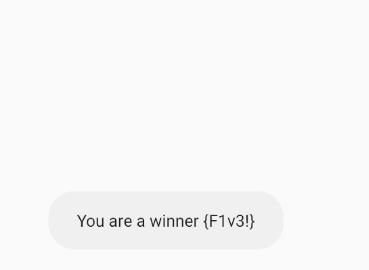
The flag is F1v3!
Flag 7 - Sqlite
What is sqlite?
Sqlite is a structure query base database that enables applications to do local storage in the application directory. The goal of the challenge is to understand how local storage of databases may lead to leakage of information.
First step is decompile FlagSevenSqliteActivity using Jadx as shown below.
public void onCreate(Bundle bundle) {
    super.onCreate(bundle);
    setContentView(R.layout.activity_flag_seven_sqlite);
    C((Toolbar) findViewById(R.id.toolbar));
    j.g.a(this);
    H();
    ((FloatingActionButton) findViewById(R.id.fab)).setOnClickListener(new a());
    SQLiteDatabase writableDatabase = this.u.getWritableDatabase();
    ContentValues contentValues = new ContentValues();
    contentValues.put("title", Base64.decode("VGhlIGZsYWcgaGFzaCE=", 0));
    contentValues.put("subtitle", Base64.decode("MmFiOTYzOTBjN2RiZTM0MzlkZTc0ZDBjOWIwYjE3Njc=", 0));
    writableDatabase.insert("Thisisatest", null, contentValues);
    contentValues.put("title", Base64.decode("VGhlIGZsYWcgaXMgYWxzbyBhIHBhc3N3b3JkIQ==", 0));
    contentValues.put("subtitle", h.c());
    writableDatabase.insert("Thisisatest", null, contentValues);
}
The method passes base64 encoded strings and stores them into string variables.From the “hint” of application name, we are creating a writable database through SQLiteDatabase functions. The activity writes some strings to the database. The database being referenced is called Thisisatest.
Next logical step is decoding the Base64 encoded strings to get the corresponding human readable form of data.
VGhlIGZsYWcgaGFzaCE    - The flag hash!
MmFiOTYzOTBjN2RiZTM0MzlkZTc0ZDBjOWIwYjE3Njc - 2ab96390c7dbe3439de74d0c9b0b1767
VGhlIGZsYWcgaXMgYWxzbyBhIHBhc3N3b3JkIQ  - The flag is also a password!
The decoded strings as shown above give us hints on solving the challenge.The author provides us with the hash of the flag.
For further analysis we decode strings defined in the Activity as shown below.
private final String w = "ZjFhZy1wYTU1";   #f1ag-pa55
private byte[] x = Base64.decode("c3FsaXRl", 0);  #sqlite
private byte[] y = Base64.decode(this.w, 0);
private final String z;
The decoded strings are f1ag-pa55 and sqlite.
    public FlagSevenSqliteActivity() {
        byte[] bArr = this.x;      //sqlite
        d.m.b.d.b(bArr, "decodedDirectoryOne");
        Charset charset = StandardCharsets.UTF_8;
        d.m.b.d.b(charset, "StandardCharsets.UTF_8");
        this.z = new String(bArr, charset);
        byte[] bArr2 = this.y;        //f1ag-pa55
        d.m.b.d.b(bArr2, "decodedDirectoryTwo");
        Charset charset2 = StandardCharsets.UTF_8;
        d.m.b.d.b(charset2, "StandardCharsets.UTF_8");
        this.A = new String(bArr2, charset2);
        f b2 = f.b();
        d.m.b.d.b(b2, "FirebaseDatabase.getInstance()");
        d d2 = b2.d();
        d.m.b.d.b(d2, "FirebaseDatabase.getInstance().reference");
        this.B = d2;
        d h = d2.h(this.z);
        d.m.b.d.b(h, "database.child(refDirectory)");
        this.C = h;
        d h2 = this.B.h(this.A);
        d.m.b.d.b(h2, "database.child(refDirectoryTwo)");
        this.D = h2;
    }
From the decompiled code, we are accessing the string x as shown in the constructor method in line 1 through bArr byte array and is then passed to variable z constructor method as referenced this.z constructor.
This means f1ag-pa55 and sqlite are our firebase nodes.
To get the firebase link, look for link in strings.xml in the resources directory of the application and manually test the firebase endpoint. Adding .json at the end of the firebase endpoint enables one to read data.
First, test endpoint using sqlite node.
vx@archie:output$ curl https://injuredandroid.firebaseio.com/sqlite.json
"S3V3N_11"
From the above results, we get our flag. Accessing endpoint using f1ag-pa55 using .json firebase trick, password.
vx@archie:output$ curl https://injuredandroid.firebaseio.com/f1ag-pa55.json
"hunter2"
hunter2 is our correct password for the challenge.
FLag 8 - AWS Storage and Security.
Goal: Understanding misconfiguration of AWS storage and security implementation in the android applications.
Decompiled flagEightclass activity code is one below.
public FlagEightLoginActivity() {
    f b2 = f.b();
    d.m.b.d.b(b2, "FirebaseDatabase.getInstance()");
    d d2 = b2.d();
    d.m.b.d.b(d2, "FirebaseDatabase.getInstance().reference");
    this.u = d2;
    d h = d2.h("/aws");
    d.m.b.d.b(h, "database.child(\"/aws\")");
    this.v = h;
}
The activity initializes firebase instance and fetches some information from the AWS child node in the firebase storage model. First check if the model is vulnerable to .json trick of firebase read write vulnerability.
vx@archie:ret2csu$ curl https://injuredandroid.firebaseio.com/aws.json
"C10ud_S3cur1ty_lol"
Next is analyzing onClick method of the activity. This method responds to events of an application clicked and are defined in the Activity.
public final void onClick(View view) {
    if (FlagEightLoginActivity.this.H() == 0) {
        if (view != null) {
            Snackbar X = Snackbar.X(view, "AWS CLI.", 0);
            X.Y("Action", null);
            X.N();
            FlagEightLoginActivity flagEightLoginActivity = FlagEightLoginActivity.this;
            flagEightLoginActivity.I(flagEightLoginActivity.H() + 1);
            return;
        }
        d.m.b.d.k();
        throw null;
    } else if (FlagEightLoginActivity.this.H() != 1) {
    } else {
        if (view != null) {
            Snackbar X2 = Snackbar.X(view, "AWS profiles and credentials.", 0);
            X2.Y("Action", null);
            X2.N();
            FlagEightLoginActivity.this.I(0);
            return;
        }
        d.m.b.d.k();
        throw null;
    }
}
From HINTS provided in the Activity, we need to understand the AWS profiles and credentials usage in order to subvert the intended behavior.
what are the AWS profile stored?
Some of interesting AWS strings are stored in strings.xml in the resources directory which are referenced throughout the application.
<string name="AWS_ID">AKIAZ36DGKTUIOLDOBN6</string>
<string name="AWS_SECRET">KKT4xQAQ5cKzJOsoSImlNFFTRxjYkoc71vuRP48S</string>
AWS CLI is a unified tool to manage your AWS services, it enables one to configure AWS services through command line and automate them through scripts. To install aws-cli on your linux machine, run the following command in the terminal.
python -m pip install --user awscliFor adding the aws profile, use the following commands.
vx@archie:~$ aws configure
AWS Access Key ID [None]: AKIAZ36DGKTUIOLDOBN6
AWS Secret Access Key [None]: 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
Flag 9- FireBase
What is firebase?
Google firebase is a mobile and web application development platform that provides a real-time database that continuously syncs data between cloud and user’s mobile devices. Firebase databases are accessible via an API and that if developers have not correctly secured their firebase database, a simple request can retrieve it`s entire content.
We need to analyze the FlagNineFirebaseActivity in order to understand how read and write rules are implemented in the application.
 public final void goToFlagNineFirebaseActivity(View view) {
        startActivity(new Intent(this, FlagNineFirebaseActivity.class));
}public FlagNineFirebaseActivity() {
byte[] decode = Base64.decode("ZmxhZ3Mv", 0); // flags/
this.v = decode;
d.m.b.d.b(decode, "decodedDirectory");
Charset charset = StandardCharsets.UTF_8;
d.m.b.d.b(charset, "StandardCharsets.UTF_8");
this.w = new String(decode, charset);
f b2 = f.b();
d.m.b.d.b(b2, "FirebaseDatabase.getInstance()");
d d2 = b2.d();
d.m.b.d.b(d2, "FirebaseDatabase.getInstance().reference");
this.x = d2;
d h = d2.h(this.w);
d.m.b.d.b(h, "database.child(refDirectory)");
this.y = h;
}Decode BASE64 encoded strings in order to understand strings stored in the decode variable.
vx@archie:~$ echo "ZmxhZ3Mv" | base64 -d
            flags/
From the above decoded string,we are getting data from firebase storage, in the flags node.
Looking at the decompiled below, it gives us an hint of solving the problem “Use the .json trick database url” .
public final void onClick(View view) {
        String str;
        if (FlagNineFirebaseActivity.this.H() == 0) {
            if (view != null) {
                str = "Use the .json trick with database url";
            } else {
                d.m.b.d.k();
                throw null;
            }
        } else if (FlagNineFirebaseActivity.this.H() == 1) {
            if (view != null) {
                str = "Filenames.";
            } else {
                d.m.b.d.k();
                throw null;
            }
Firebase Realtime Rules
Realtime database stores data as one large JSON tree and synchronized every time a new device is connected.The data received or stored in the database is determined by the security rules of read and write.
Firebase allows read and write rules to the database to be set to true or false. When .read is set to true means describes if and data is allowed to be read by users and .write describes if and when data is allowed to be written.
Example of a firebase rule where read and write are allowed.
{
    "rules": {
        ".read": true,
        ".write": true
    }
}
When read and write rules are enabled means that everyone with access to the application can read and write unauthorized data to the database.
The firebase database url is defined in strings.xml file in the resource section.
<string name="firebase_database_url">https://injuredandroid.firebaseio.com</string>The firebase node defined in our instance is flags node, to check if the endpoint node is vulnerable we append a .json at the end of the url node as shown in the image below.
vx@archie:injured$ curl https://injuredandroid.firebaseio.com/flags/.json
"[nine!_flag]"
If the url returns data, means our endpoint is vulnerable. From the above output we were able to successfully solve the challenge.
Securing Firebase
One can secure Firebase database by only allowing users of application to have only read permissions to a certain tree node instead of allowing read to the root node in the application. This means the applications can not read data from the neighboring nodes.
{
    "rules": {
        "flag": {
            ".read": true,
            ".write": false
        }
    }
}